
Make the next step visible
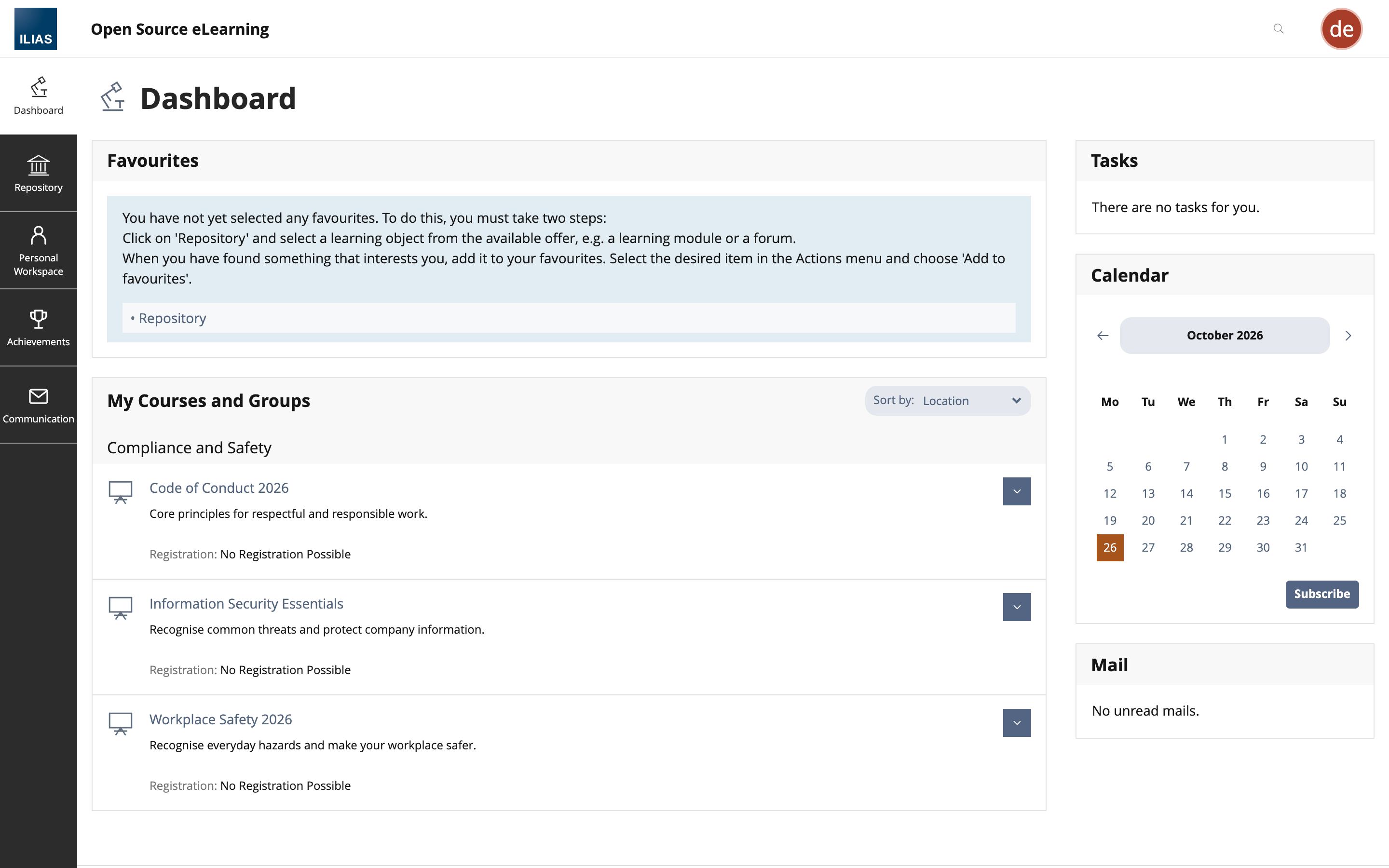
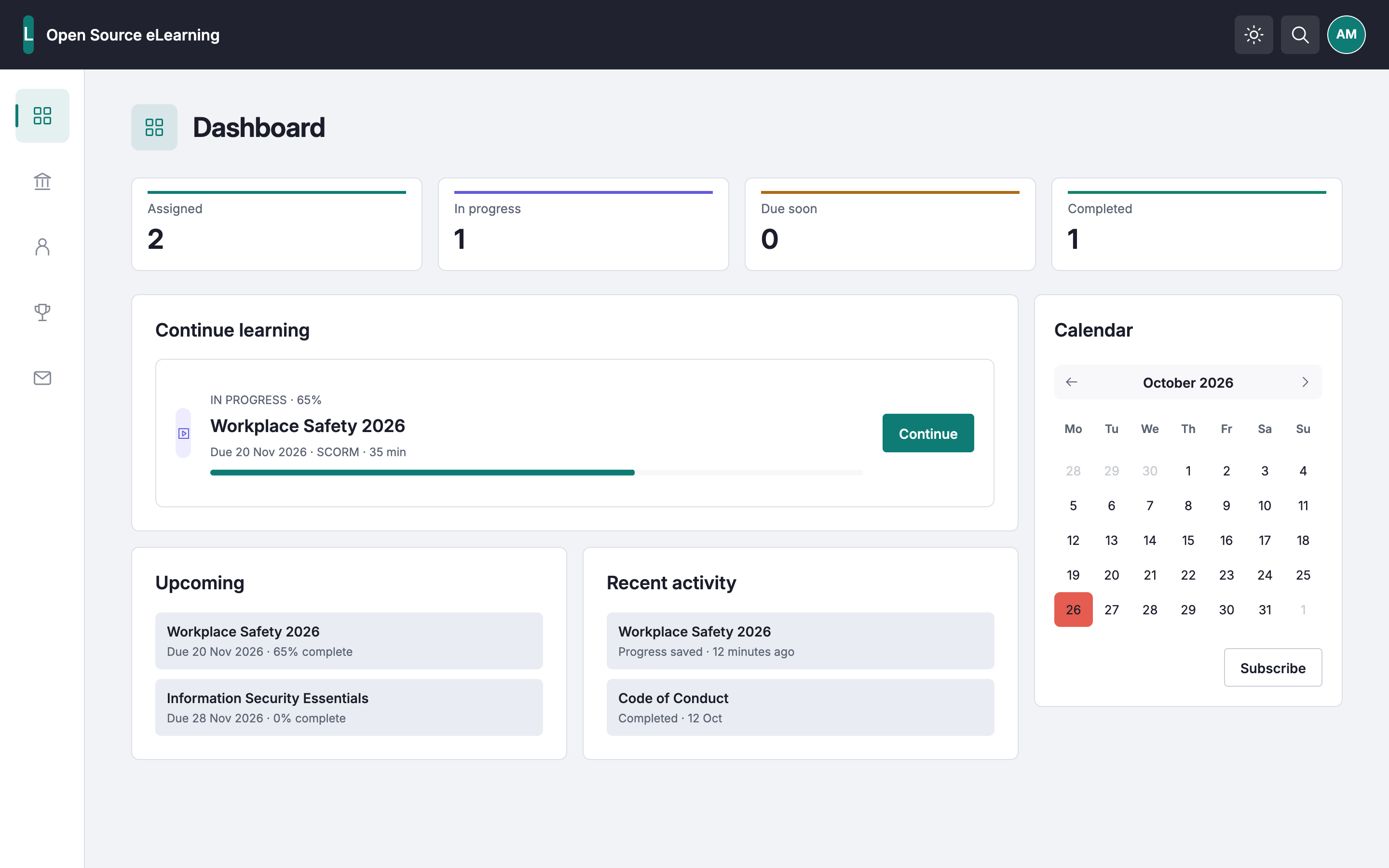
The Original interface starts with favourites and LMS objects. In Light, I brought course status, progress and the next action together on the learner Dashboard
 Enlarge screen
  Enlarge screen
 Product owner for the PoC · Business analysis · Self-hosted product exploration
I chose to explore ILIAS as a self-hosted option for corporate learning. The aim was to start with essential workflows, make everyday tasks clearer and leave room for future development
Swipe across the demo to explore the desktop interface, or choose Fit to screen for an overview
The interactive workspace will appear here
The interactive demo is available in a desktop-sized window. Here, explore the key screens and the product decisions behind them
The Original interface starts with favourites and LMS objects. In Light, I brought course status, progress and the next action together on the learner Dashboard
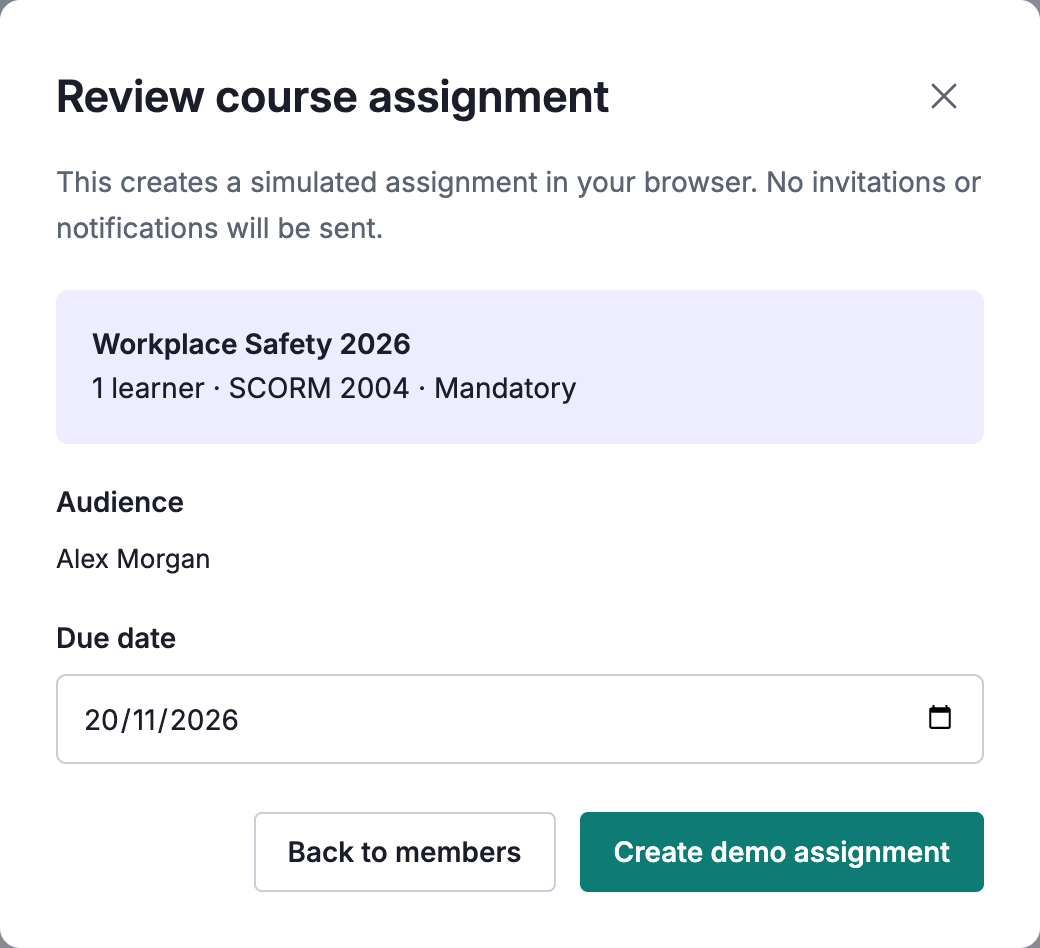
Enlarge screen Enlarge screen I separated course content from the decision about who should receive it. The administrator selects learners, then reviews the audience and deadline before assignment
 Enlarge detail
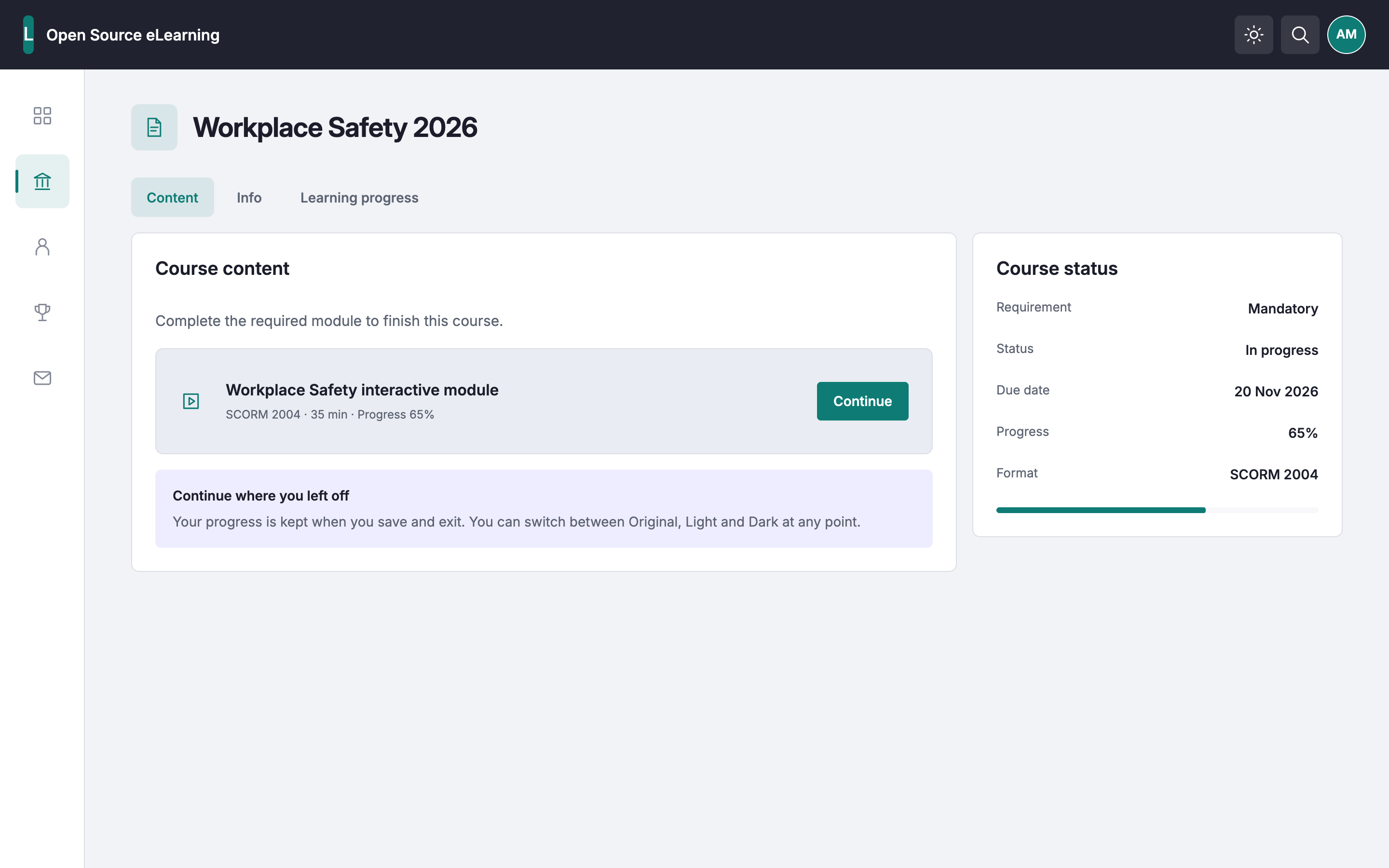
 The course page brings the learning module, due date and current status together. Continue takes the learner back to the activity; the LMS remains responsible for tracking progress
 View full screen
 Screens from the public reconstruction, using fictional data. They illustrate the proposed workflows, not production adoption or validated user outcomes
The question was not simply whether ILIAS could run a course. It was whether employees and administrators could manage everyday learning tasks in it, and whether there was a viable way to move from the existing platform
The business needed to continue providing corporate learning as budget constraints changed. An earlier market evaluation had identified a commercial LMS as the best match for the company’s functional requirements, but the purchase was not approved
I investigated whether an independently managed, self-hosted LMS could support the company’s learning workflows and what would need to change
The PoC explored what the platform could support, how people would use it, the limits of the deployment and future integration requirements. It was not intended to prove that ILIAS matched the shortlisted commercial platform or would reduce total costs
Preserving two years of existing SCORM courses mattered as much as cost, but moving course files alone would not keep learning running. I considered Google Classroom, which was already available to us, a cheaper commercial LMS and ILIAS without interface changes. In my assessment, these paths meant content rework, functional compromises or leaving the usability issues unresolved
I chose to test ILIAS with an adapted presentation layer, not to assume it was already a better replacement
I acted as the product owner for the PoC and combined several responsibilities:
I remained accountable for product direction, quality and final acceptance. The AI-assisted delivery section explains how I divided the work with Codex
A future transition needed to happen quickly without interrupting learning. Progress, recorded learning history and reporting evidence had to remain available throughout the change, not only after the new platform was in place
The platform also needed records of learning-related user actions, complete enough to reconstruct recorded activity and provide evidence of course completion for auditors. The available evidence does not establish the logging scope, retention rules or validated completeness
During my ILIAS walkthrough, I found learning objects, course containers, completion settings and membership in separate parts of the interface. I needed to connect the administrator’s setup process with the learner’s course attempt, while leaving progress tracking to ILIAS
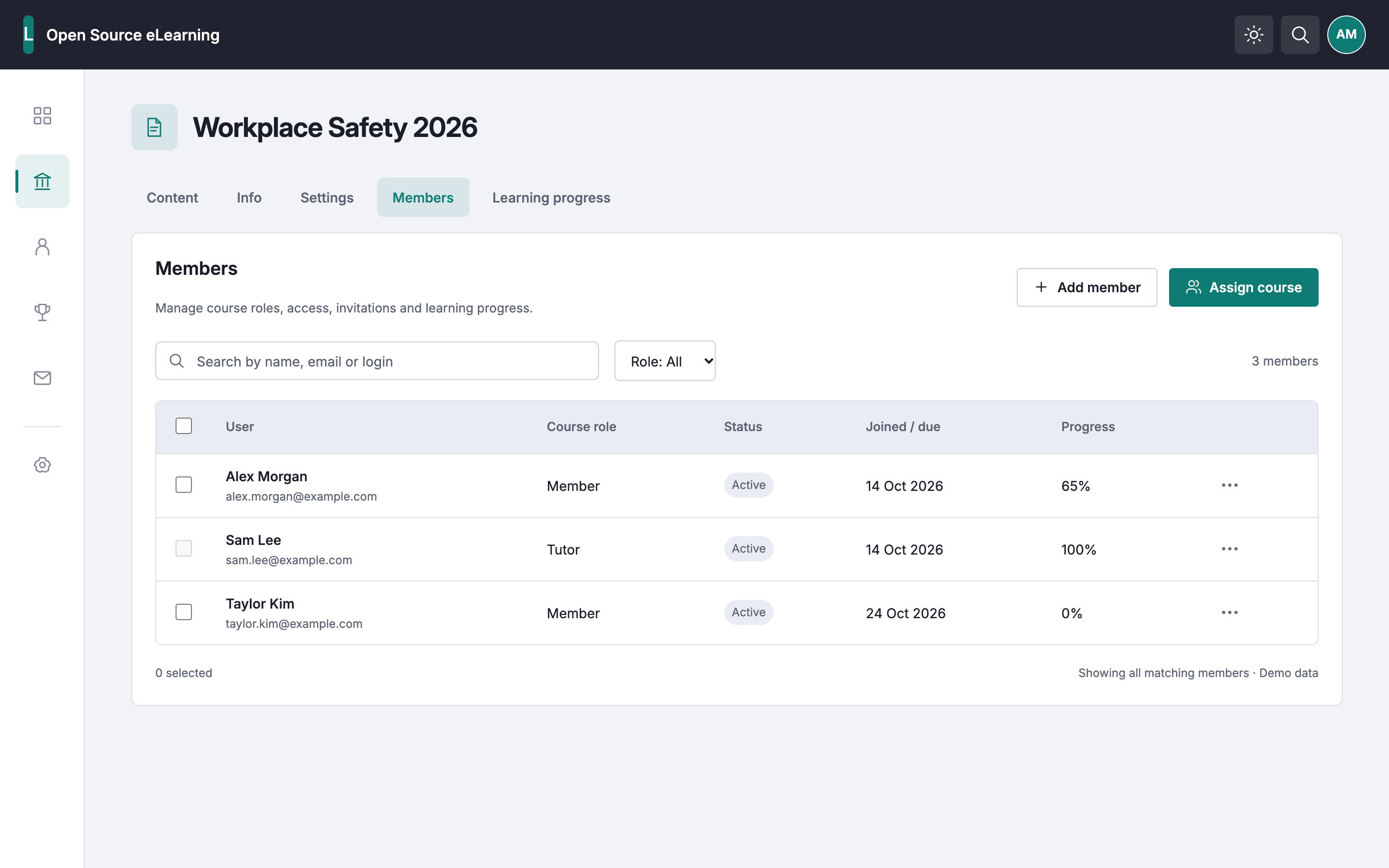
I kept the underlying LMS model and aimed to make the sequence easier to follow. Each step had its own operational decision, responsible role and acceptance criteria
An imported SCORM package is not automatically a published course, and a published course is not automatically an assignment. I treated these as separate product states with separate administrator decisions and acceptance criteria
Each step needed a review before the administrator moved on. A successful upload alone would not complete an assignment
Learners, tutors and course administrators have different responsibilities and next actions. I mapped their pages and states, then prioritised the minimum functionality needed for an initial launch rather than exposing all of ILIAS or reproducing every commercial LMS feature
Further capabilities would follow in stages. The aim was to avoid changing too much at once and reduce the risk of errors, but progress, learning history and required reporting were non-negotiable parts of the initial scope
I set a requirement not to change the ILIAS core for product-specific behaviour. Customisation was placed in a separate skin, with extension boundaries and a documented policy for upstream fixes
The goal was to avoid creating a separate version of ILIAS that would become difficult to upgrade and maintain. I updated and refined the system while developing the PoC
I prioritised Light before Dark so that shared components and their states could be reviewed in one theme before extending the semantic token system
Shared components, tokens and rules were also intended to support new features and pages after the initial launch, without rebuilding each screen from scratch. Figma became the design reference, with explicit visual acceptance criteria
The learning state determines the next action: start an assigned course, continue an attempt or review completed learning. The card structure and action position stay consistent across states
ASSIGNED · NOT STARTED
Workplace Safety 2026
IN PROGRESS · 65%
Workplace Safety 2026
COMPLETED · 12 JUL 2026
Workplace Safety 2026
All three variants use the same surface, padding and corner-radius variables. The Continue action is bound to the primary colour token
color/surface-solidLight alias → light/surface-solid · #FFFFFFspacing/520 px on all four sidesradius/md8 px on all four cornerscolor/primaryLight alias → light/primary · #0E7C75Names and bindings checked against the saved Figma nodes. This is a readable extract of their properties, not a screenshot of the editor
The learner Dashboard uses an instance of the In progress variant. The outline marks that exact instance in the exported screen
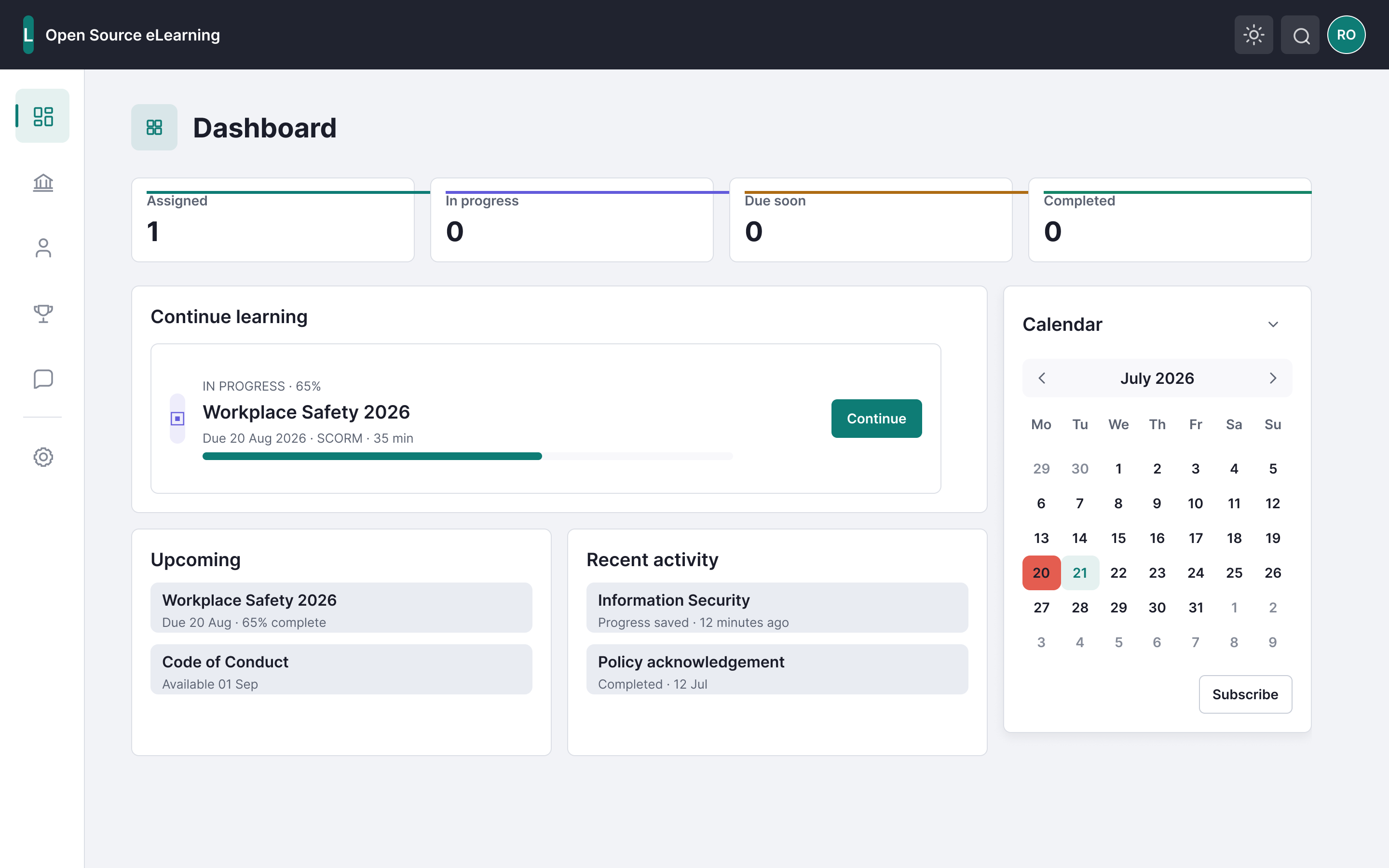
Course details are sample data. Original Figma exports remain available for inspection; the implementation status is recorded below
The final Unified Light design was implemented and checked on the running ILIAS PoC
The prototype received positive feedback from management and was presented to C-level stakeholders for further consideration. This helped communicate the product direction and potential operating model, but it did not represent production approval, a confirmed budget or company-wide user validation
Back to case overviewEarly iterations relied on direct CSS and template changes in the test LMS. I refined the interface, but local fixes created visual drift and made consistency harder to maintain
I changed the delivery process:
The saved design audit found no missing styles, missing fonts or broken instances within the scope reviewed. This example shows how a clipping issue was corrected in the shared component and checked again:
Codex carried out a substantial part of the work: researching documentation, configuring the server, generating code, implementing the skin, building designs in Figma, documenting the repository and running automated checks
I set the objectives, constraints, expected output and acceptance criteria. I reviewed Codex’s work for defects and scope gaps, and requested changes when the result fell short of the intended product behaviour
This PoC did not establish company-wide adoption, production readiness, measured cost savings, multi-instance operation, completed Okta, HiBob or Slack integrations, or improved learning outcomes
Migration, preservation of historical records and audit-log completeness were not validated, and no formal auditor approval is claimed. The test installation was later removed. The saved design audit does not rule out runtime defects; this public demo cannot substitute for validation on a live LMS
I would reconsider ILIAS if interface changes disrupted core learning tasks or required enough extra engineering and design work to undermine the expected cost advantage. Open source was an option to investigate, not a choice to defend regardless of the evidence
My recommendation would be to run a limited compliance-course pilot before considering a wider rollout. This would allow us to validate essential learner workflows, confirm that completion data is recorded correctly and identify usability issues with real employees
Before a pilot, I would establish baseline and target measures for:
A transition would also require checking that progress and learning history matched across platforms, that recorded learning actions were complete and that completion evidence could be retrieved. Acceptance criteria for these checks would need to be agreed before migration
I would interview pilot participants about the difficulties they encountered. Engineering and security review, hosting costs and support requirements would also need assessment before a corporate rollout
I’m looking for a Product Owner or Product Manager role combining product judgement, business analysis and hands-on delivery
ILIAS and its logo belong to their respective rights holders; this independent exploration does not imply endorsement. ILIAS licence · Inter licence · Open Sans licence · Open Sans notice · MacBook frame: Monkr · MIT licence


